Sending the same invoice every month is one of the most repetitive tasks for freelancers and small business owners.
If you bill clients on a regular schedule, manually creating invoices can waste time, increase errors, and lead to missed payments.
That’s where recurring invoices help.
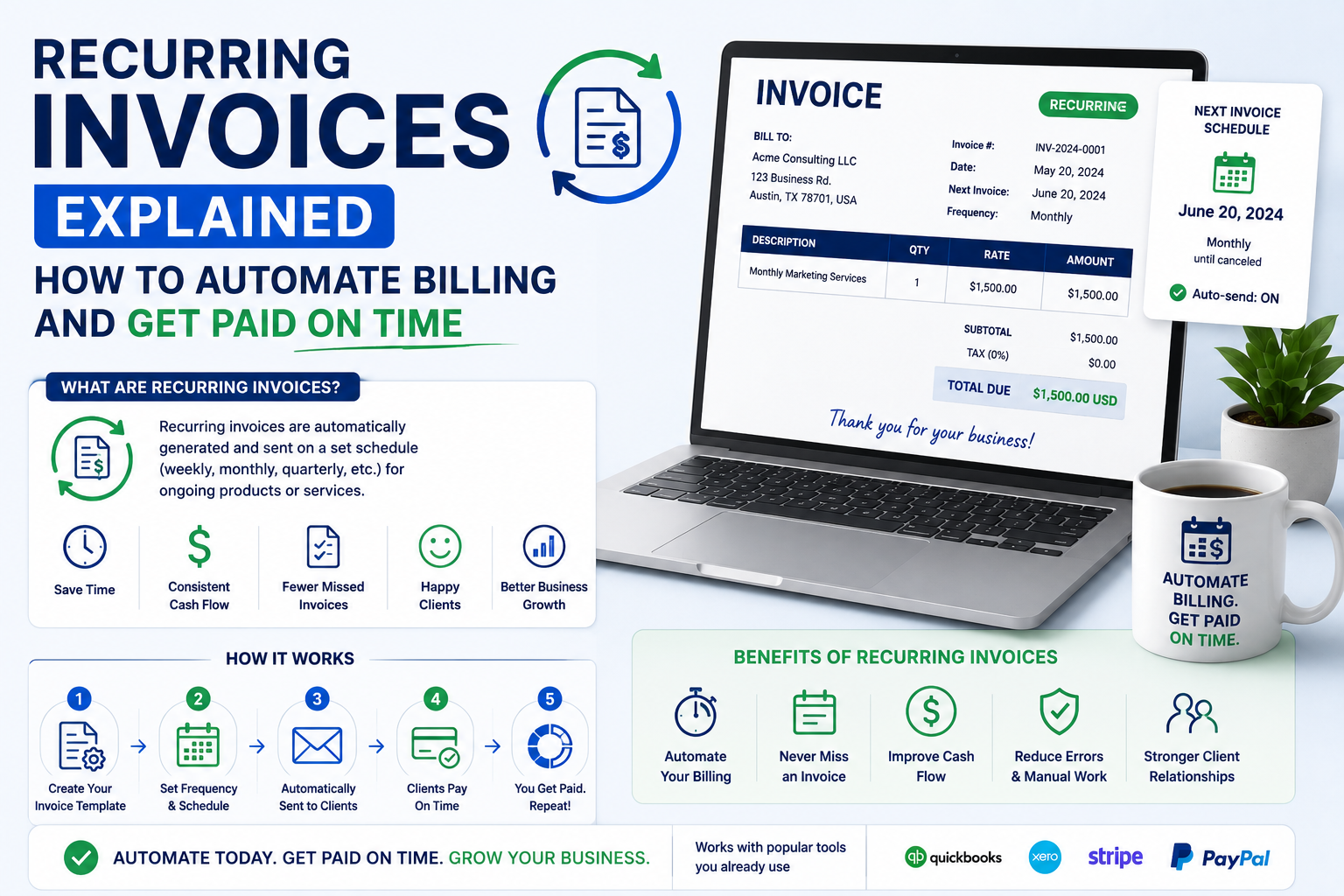
Recurring invoicing automates the billing process by generating and sending invoices on a predefined schedule. Instead of creating invoices from scratch each month, businesses can automate billing, payment reminders, and invoice tracking.
The result is less administrative work, more predictable cash flow, and faster payments.
Whether you’re a freelancer with monthly retainers, a marketing agency managing recurring clients, a coach running membership programs, or a subscription-based business, recurring invoices can streamline your operations.
Need a simple way to automate invoicing?
Create and manage recurring invoices using the free invoice generator at ilove-invoice.com
What Is a Recurring Invoice?
Featured Snippet Answer
A recurring invoice is an invoice that is automatically created and sent to customers on a scheduled basis, such as weekly, monthly, quarterly, or annually. Businesses use recurring invoices for ongoing services, subscriptions, retainers, and maintenance agreements to automate billing and improve payment consistency.
Recurring Invoice Definition
A recurring invoice is an automated invoice generated at regular intervals.
Instead of manually creating invoices every billing cycle, the system automatically creates and sends them according to a schedule.
Common billing frequencies include:
- Weekly
- Bi-weekly
- Monthly
- Quarterly
- Annually
How Recurring Invoices Work
The process is simple:
- Create an invoice template.
- Set billing frequency.
- Add client details.
- Configure payment terms.
- Schedule automatic delivery.
- Track payments.
After setup, invoices are generated automatically.
Recurring Invoice vs One-Time Invoice
A standard invoice is created manually for a single transaction.
A recurring invoice is created automatically for ongoing billing arrangements.
When Should Businesses Use Recurring Invoices?
Recurring invoicing works best when the amount billed remains consistent.
Common Use Cases
Monthly Retainers
Marketing agencies often bill the same monthly management fee.
Subscription Services
Software companies frequently charge recurring monthly or annual fees.
Ongoing Consulting
Consultants working under monthly agreements benefit from automated billing.
Maintenance Contracts
IT providers and maintenance companies often bill clients monthly.
Membership Programs
Gyms, coaching communities, and professional organizations commonly use recurring invoices.
Recurring Invoice Use Cases Comparison
| Business Type | Recurring Invoices Recommended? | Typical Frequency |
|---|---|---|
| Freelancer Retainer | Yes | Monthly |
| Marketing Agency | Yes | Monthly |
| Consultant | Yes | Monthly |
| Software Company | Yes | Monthly / Annual |
| Membership Business | Yes | Monthly |
| One-Time Projects | No | As Needed |
| Contractors | Sometimes | Milestone-Based |
Benefits of Recurring Invoices
Recurring billing provides significant operational advantages.
Predictable Cash Flow
Consistent billing creates more predictable revenue.
Businesses can forecast income more accurately.
Reduced Administrative Work
Instead of generating dozens of invoices manually, recurring billing automates the process.
This saves time every month.
Fewer Missed Invoices
Manual invoicing increases the risk of forgetting to bill a client.
Automation eliminates that problem.
Faster Payments
Automated invoices are often sent immediately on the billing date.
This reduces delays.
Better Customer Experience
Clients appreciate consistent and predictable billing schedules.
Why Businesses Automate Billing
| Benefit | Business Impact |
|---|---|
| Less Manual Work | Higher Efficiency |
| Faster Invoicing | Faster Payments |
| Fewer Errors | Better Accuracy |
| Automated Reminders | Lower Late Payment Rates |
| Better Reporting | Improved Decision-Making |
Recurring Invoice vs Standard Invoice
| Feature | Recurring Invoice | Standard Invoice |
|---|---|---|
| Creation | Automated | Manual |
| Billing Frequency | Scheduled | One-Time |
| Time Required | Low | Higher |
| Risk of Missing Invoice | Very Low | Higher |
| Best For | Ongoing Services | One-Off Projects |
| Automation | Yes | Limited |
Which Option Is Better?
If you bill clients regularly, recurring invoices are almost always the better option.
If every project has different pricing, standard invoices may be more appropriate.
How to Create a Recurring Invoice
Step 1 – Set Billing Frequency
Choose how often invoices should be generated.
Examples:
- Weekly
- Monthly
- Quarterly
- Annually
Monthly billing is the most common option.
Step 2 – Add Customer Details
Include:
- Client name
- Company name
- Billing address
- Contact email
Verify information before activating automation.
Step 3 – Define Services
Clearly describe:
- Services included
- Monthly fee
- Quantity
- Scope of work
Step 4 – Add Payment Terms
Examples:
- Due Upon Receipt
- Net 7
- Net 15
- Net 30
For recurring billing, Net 15 is commonly used.
More information: What Are Invoice Payment Terms
Step 5 – Automate Reminders
Configure reminders:
- Before due date
- On due date
- After due date
Reminders significantly reduce overdue invoices.
Step 6 – Track Payments
Monitor:
- Paid invoices
- Outstanding invoices
- Overdue balances
Automation should not replace payment monitoring.
Recurring Invoice Example
| Invoice Field | Example |
|---|---|
| Invoice Number | INV-2026-1001 |
| Invoice Date | July 1, 2026 |
| Due Date | July 15, 2026 |
| Client | ABC Marketing LLC |
| Service | Monthly SEO Management |
| Billing Period | July 2026 |
| Amount | $1,500 |
| Tax | $0 |
| Total Due | $1,500 |
| Payment Terms | Net 15 |
Best Payment Terms for Recurring Billing
| Payment Term | Best For | Pros | Cons |
|---|---|---|---|
| Due Upon Receipt | Small recurring invoices | Fastest payment | Some clients prefer terms |
| Net 7 | Agencies | Quick cash flow | Requires reminders |
| Net 15 | Consultants | Balanced approach | Slight delay |
| Net 30 | Enterprise clients | Widely accepted | Slower payment |
| Auto-Pay | Subscriptions | Maximum convenience | Requires customer setup |
Recommended Option
For most recurring service businesses:
- Net 15
- Auto-pay
provide the best results.
Common Recurring Invoice Mistakes
Incorrect Billing Dates
Problem
Invoices are generated on the wrong schedule.
Solution
Review schedules regularly.
Outdated Pricing
Problem
Invoice amounts no longer match agreements.
Solution
Update recurring templates whenever pricing changes.
Missing Payment Methods
Problem
Clients struggle to pay.
Solution
Offer multiple payment options.
No Automated Reminders
Problem
Late payments increase.
Solution
Enable reminder sequences.
Poor Record Keeping
Problem
Payment history becomes difficult to track.
Solution
Maintain organized invoice records.
Duplicate Recurring Invoices
Problem
Clients receive multiple invoices.
Solution
Audit recurring billing schedules regularly.
Industries That Benefit Most from Recurring Invoices
Freelancers
Retainer-based freelancers often invoice monthly.
Examples:
- Content writers
- Virtual assistants
- SEO specialists
Marketing Agencies
Recurring invoices work extremely well for:
- SEO retainers
- PPC management
- Social media management
Consultants
Monthly advisory agreements are ideal for recurring billing.
Coaches
Business and life coaches often charge recurring monthly fees.
Software Companies
Subscription billing is built around recurring invoicing.
Membership Businesses
Membership organizations benefit from automated billing cycles.
How Invoice Automation Improves Cash Flow
Automation does more than save time.
It directly improves cash flow.
Automated Scheduling
Invoices are generated exactly when they should be.
No missed billing cycles.
Automated Reminders
Clients receive payment reminders without manual effort.
Better Tracking
Businesses gain visibility into:
- Outstanding invoices
- Overdue balances
- Payment history
Improved Reporting
Recurring billing data supports:
- Revenue forecasting
- Client retention analysis
- Cash flow planning
Why Automation Matters
Manual invoicing creates risk.
Automation improves:
- Accuracy
- Consistency
- Efficiency
- Collection rates
For businesses managing multiple recurring clients, automation quickly becomes essential.
Create recurring invoices automatically using ilove-invoice.com
Recurring Invoice Checklist
Before activating recurring billing:
- Client information verified
- Billing frequency selected
- Invoice template reviewed
- Pricing confirmed
- Payment terms added
- Payment methods configured
- Reminder schedule enabled
- Tax information included
- Invoice numbering enabled
- Reporting setup completed
Conclusion
Recurring invoices help businesses automate billing, reduce administrative work, and improve cash flow.
If you invoice clients regularly, recurring billing can eliminate repetitive tasks while improving payment consistency.
Key benefits include:
- Automated billing
- Faster payments
- Fewer missed invoices
- Better client experience
- Improved financial reporting
Recurring invoicing is especially valuable for freelancers, consultants, agencies, coaches, software companies, and subscription-based businesses.
Ready to simplify billing?
Automate recurring invoices and streamline your invoicing process with iLove Invoice.