An invoice is more than a payment request.
It’s a business document that directly impacts how quickly you get paid.
A poorly formatted invoice can confuse clients, create approval delays, and increase the chances of payment disputes. A professional invoice format makes it easier for clients to understand what they owe, how to pay, and when payment is due.
Many small businesses struggle with:
- Missing invoice information
- Poor invoice layouts
- Unclear payment terms
- Inconsistent formatting
- Difficult-to-read invoices
Fortunately, creating a professional invoice format is simpler than most business owners think.
This guide explains the best invoice formats for small businesses in the United States, including invoice examples, templates, layouts, industry-specific recommendations, and invoicing best practices.
Need a professional invoice template?
Create invoices instantly using the free invoice generator at https://ilove-invoice.com/
What Is the Best Invoice Format for Small Businesses?
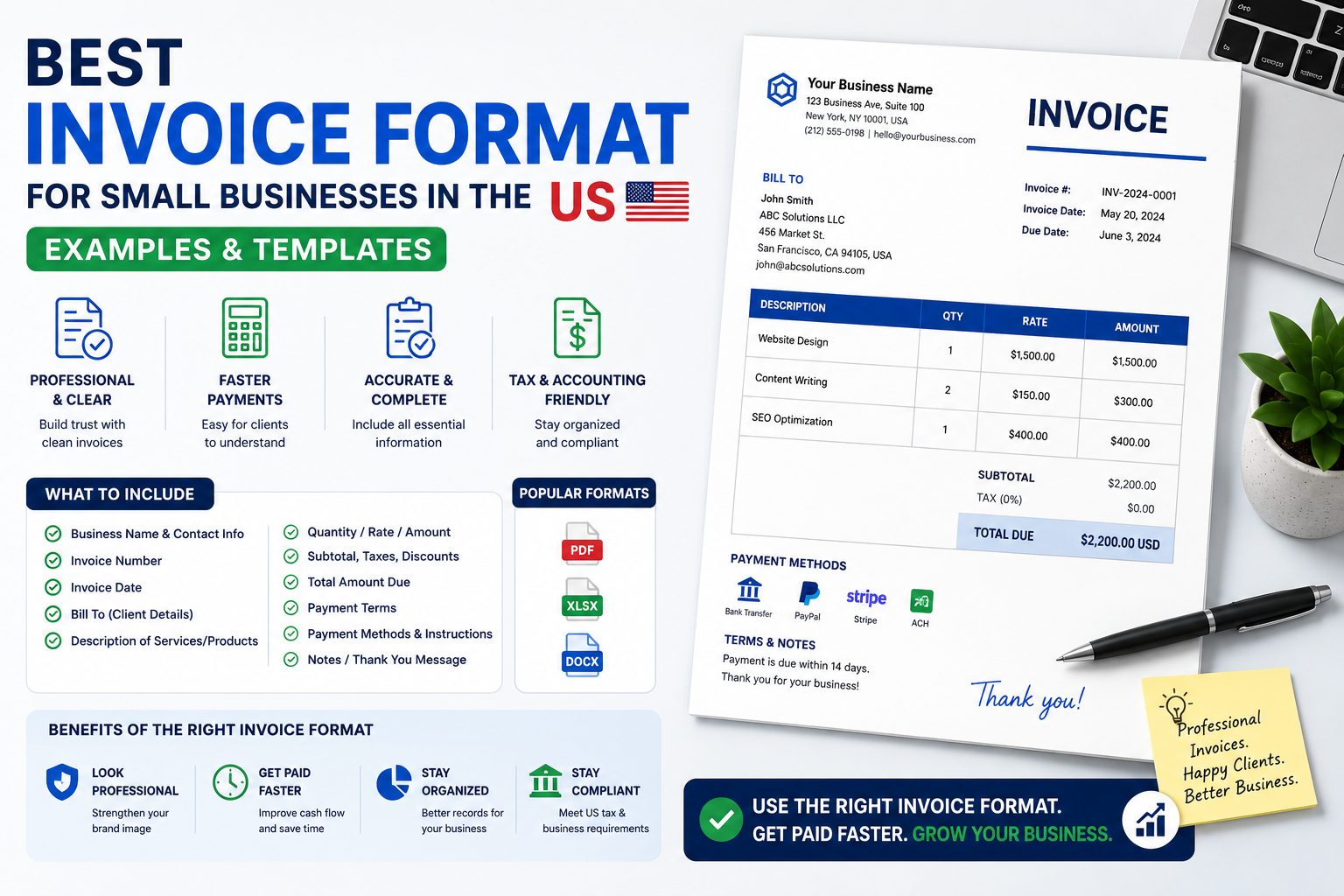
The best invoice format for small businesses includes a clear header, business and client information, invoice number, invoice date, due date, itemized services or products, taxes, payment instructions, and total amount due. PDF invoices generated through invoicing software are typically the most professional and easiest for clients to process.
What Is an Invoice Format?
An invoice format is the structure and layout used to present invoice information.
It determines:
- How information is organized
- How easy the invoice is to read
- How quickly clients can process payment
A professional invoice format ensures important information is easy to find.
Why Format Matters
Clients often review dozens or hundreds of invoices.
A clear invoice format helps them quickly identify:
- Who sent the invoice
- What they are paying for
- How much they owe
- When payment is due
- How payment should be made
The easier your invoice is to process, the faster you’re likely to get paid.
Why Invoice Format Impacts Payment Speed
Many payment delays happen because invoices are difficult to review.
Accounts payable departments prefer invoices that are clear, consistent, and complete.
Better Client Experience
Professional layouts improve readability.
Clients spend less time reviewing invoices and more time approving them.
Faster Approvals
Invoices with clearly displayed:
- Invoice numbers
- Due dates
- Payment terms
- Total amounts
typically move through approval workflows faster.
Reduced Errors
A structured invoice format reduces:
- Missing information
- Calculation mistakes
- Client questions
Better Record Keeping
Well-formatted invoices improve:
- Accounting
- Tax reporting
- Payment tracking
Useful resources:
IRS: https://www.irs.gov/
SBA: https://www.sba.gov/
What Every Professional Invoice Must Include
Regardless of industry, every invoice should include the following information.
Professional Invoice Checklist
Business Information
- ✓ Business Name
- ✓ Address
- ✓ Phone Number
- ✓ Email Address
- ✓ Website (Optional)
Client Information
- ✓ Client Name
- ✓ Company Name
- ✓ Billing Address
Invoice Information
- ✓ Invoice Number
- ✓ Invoice Date
- ✓ Due Date
Service Information
- ✓ Products or Services
- ✓ Quantity
- ✓ Rate
- ✓ Subtotal
Financial Information
- ✓ Taxes
- ✓ Discounts (if applicable)
- ✓ Total Amount Due
Payment Information
- ✓ Payment Terms
- ✓ Payment Instructions
- ✓ Payment Methods
Invoice Components Table
| Component | Required |
|---|---|
| Business Details | Yes |
| Client Information | Yes |
| Invoice Number | Yes |
| Invoice Date | Yes |
| Due Date | Yes |
| Service Description | Yes |
| Pricing | Yes |
| Payment Terms | Yes |
| Total Due | Yes |
| Payment Instructions | Yes |
Best Invoice Formats Explained
Different business situations require different invoice formats.
Standard Invoice Format
Purpose
General billing for products or services.
Advantages
- Most widely accepted
- Easy to create
- Professional appearance
Disadvantages
- Limited flexibility for complex projects
Best For
- Freelancers
- Consultants
- Agencies
- Small businesses
Proforma Invoice Format
Purpose
Provides a quote before work begins.
Advantages
- Sets expectations
- Helps clients approve projects
Disadvantages
- Not a payment request
Best For
- Custom projects
- International clients
Recurring Invoice Format
Purpose
Used for ongoing monthly services.
Advantages
- Saves time
- Consistent billing
Disadvantages
- Requires regular monitoring
Best For
- Retainers
- Memberships
- Subscription services
Timesheet Invoice Format
Purpose
Bills clients by hours worked.
Advantages
- Detailed billing
- Transparent pricing
Disadvantages
- Requires time tracking
Best For
- Freelancers
- Consultants
- Virtual assistants
Project-Based Invoice Format
Purpose
Bills for completed project milestones.
Advantages
- Clear deliverables
- Easy budgeting
Disadvantages
- Less flexible than hourly billing
Best For
- Designers
- Developers
- Marketing agencies
Deposit Invoice Format
Purpose
Requests upfront payment.
Advantages
- Improves cash flow
- Reduces risk
Disadvantages
- Some clients may resist deposits
Best For
- Contractors
- Agencies
- Large projects
Invoice Format Examples
Freelancer Invoice Example
| Item | Amount |
|---|---|
| SEO Content Writing | $1,000 |
| Keyword Research | $300 |
| Total Due | $1,300 |
Consultant Invoice Example
| Item | Amount |
|---|---|
| Strategy Session | $750 |
| Advisory Services | $500 |
| Total Due | $1,250 |
Marketing Agency Invoice Example
| Item | Amount |
|---|---|
| Google Ads Management | $1,500 |
| Reporting | $300 |
| Total Due | $1,800 |
Contractor Invoice Example
| Item | Amount |
|---|---|
| Labor | $5,000 |
| Materials | $2,000 |
| Total Due | $7,000 |
Photographer Invoice Example
| Item | Amount |
|---|---|
| Event Photography | $1,200 |
| Editing | $300 |
| Total Due | $1,500 |
Web Designer Invoice Example
| Item | Amount |
|---|---|
| Website Design | $2,500 |
| Hosting Setup | $200 |
| Total Due | $2,700 |
Best Invoice Layout Practices
Invoice design affects readability.
Keep layouts clean and professional.
Header Placement
Place the following at the top:
- Business name
- Logo
- Invoice number
- Invoice date
This information should be visible immediately.
Logo Usage
Use a logo if available.
Avoid oversized logos that dominate the page.
Font Choices
Recommended fonts:
- Arial
- Helvetica
- Calibri
Use readable font sizes.
Color Usage
Use brand colors sparingly.
Important information should remain easy to read.
Mobile-Friendly Design
Many invoices are reviewed on mobile devices.
Ensure:
- Clear spacing
- Large text
- Simple layouts
Invoice Format Mistakes to Avoid
Missing Payment Terms
Problem:
Clients don’t know when payment is due.
Solution:
Clearly display payment terms.
Poor Formatting
Problem:
Invoices look cluttered.
Solution:
Use consistent spacing and structure.
Missing Invoice Numbers
Problem:
Tracking becomes difficult.
Solution:
Use a structured numbering system.
Read: https://ilove-invoice.com/blog/invoice-numbering-guide
Unclear Service Descriptions
Problem:
Clients question charges.
Solution:
Use detailed descriptions.
Missing Tax Information
Problem:
Approval delays and compliance risks.
Solution:
Include required tax details.
PDF vs Word vs Excel vs Online Invoice Generators
| Feature | Word | Excel | Invoice Generator | |
|---|---|---|---|---|
| Ease of Use | High | Medium | Medium | High |
| Customization | Medium | High | High | High |
| Professional Appearance | High | Medium | Medium | High |
| Automation | None | None | Low | High |
| Payment Tracking | No | No | Limited | Yes |
| Error Reduction | Medium | Low | Medium | High |
Best Overall Choice
Online invoice generators offer:
- Automatic calculations
- Professional layouts
- Invoice tracking
- Numbering automation
- Payment reminders
For most businesses, they provide the best balance of professionalism and efficiency.
How to Create the Perfect Invoice Format
Step 1
Add business information.
Step 2
Add client information.
Step 3
Assign an invoice number.
Step 4
List services or products.
Step 5
Add pricing and taxes.
Step 6
Include payment terms.
Step 7
Add payment instructions.
Step 8
Review the invoice.
Step 9
Save as PDF.
Step 10
Send promptly.
Industry-Specific Invoice Format Recommendations
Freelancers
Best Format:
Simple standard invoice.
Focus on:
- Service descriptions
- Payment terms
- Due dates
Consultants
Best Format:
Timesheet or project-based invoice.
Marketing Agencies
Best Format:
Project-based invoice with detailed deliverables.
Contractors
Best Format:
Deposit and milestone invoice structure.
E-commerce Businesses
Best Format:
Order-based invoice.
Professional Services
Best Format:
Standard invoice with detailed service breakdown.
Conclusion
The best invoice format is one that is clear, professional, easy to read, and easy to process.
A strong invoice format should always include:
- Business information
- Client information
- Invoice number
- Due date
- Itemized services
- Payment terms
- Payment instructions
- Total amount due
Whether you’re a freelancer, consultant, contractor, agency, or small business owner, a professional invoice format can help you get paid faster and reduce payment disputes.
Ready to create professional invoices?
Create professional invoices instantly using iLove Invoice’s free invoice generator and customizable invoice templates.
Related Resources
Homepage: https://ilove-invoice.com/
Professional Invoice Guide: https://ilove-invoice.com/blog/how-to-create-a-professional-invoice
Invoice Numbering Guide: https://ilove-invoice.com/blog/invoice-numbering-guide
Invoice Payment Terms Guide: https://ilove-invoice.com/blog/what-are-invoice-payment-terms
Invoice Mistakes Guide: https://ilove-invoice.com/blog/common-invoice-mistakes
How to Invoice a Client for the First Time in the US: https://ilove-invoice.com/blog/how-to-invoice-a-client-for-the-first-time-in-the-us
How to Invoice International Clients: https://ilove-invoice.com/blog/how-to-invoice-international-clients
Freelance Invoice Guide: https://ilove-invoice.com/blog/freelance-invoice-guide
Invoice vs Receipt: https://ilove-invoice.com/blog/invoice-vs-receipt